 Tutorial
First, create an account
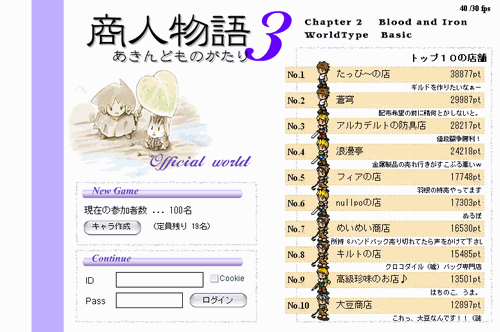 On the left side of the login screen, find
 and click it.
Tip: You cannot create an account when the player limit has been reached. Please check again another day.
“Merchant Story 3 Terms of Use”will appear. Read them carefully.
You cannot join the game unless you agree to the terms of use.
After reading and agreeing, click
 and enter your character details.
Account ID
Avoid easily guessed names such as “aaaaa” or “abcdefg”.They can lead to your account being taken over.
Password
Likewise, avoid strings that are easy to guess.Be sure to write down your password so you do not forget it.
Gender
There is no difference in abilities, so choose whichever you prefer.Character name
Your character name cannot be changed later, so choose carefully.Starting keyword
The starting keyword is listed on the Basic rules page.After checking that everything is correct, click
 to finish creating your account.
Try logging in
On the login screen, enter your ID and password, then click to log in.
You are done when “Login successful” appears.
Tip: “Notice” contains announcements from the operator. Be sure to read them. Click
 to finally begin the game!