 Tutorial
Understanding the screen (in town)
In town, you will see the following screen.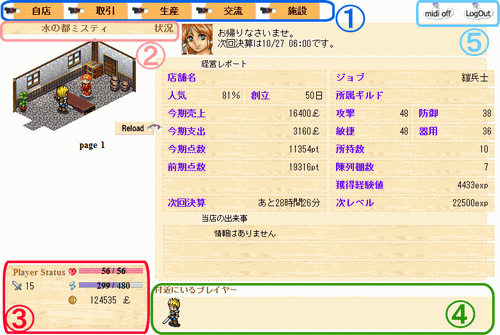
1. Main menu
This is displayed only while you are in town.“My shop”“Trade”“Production”“Community”“Facilities”: hover over any of these entries to display its submenu.
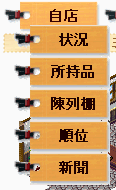 ← Like this. “Status” and “Inventory” are examples of submenu entries.
2. Current location
This shows where you are now.3. Status
 … Your level.
 … Your Life.
 … Your Force.
 … Your money.
4. Nearby players
Players in the same area are shown here.Their clothing changes according to their job (occupation).
Click a player you want to talk to in order to send them a Wis.
Click yourself to send a Wis to people around you.
5. BGM and logout buttons
 … Toggles the BGM on or off.
 … The logout button. Always log out when you finish playing.
The next page explains how to open a shop.