 Tutorial
Into the Field!
Let's venture into the outside world—the field—to get those materials.In the main menu, open “Facilities”, then select “Gate”.
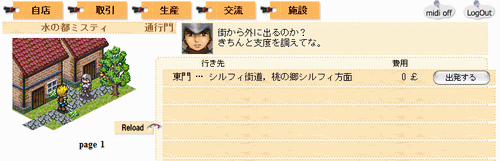 “East Gate” is listed there. Press
  to enter the field.
The Field Screen
Here is an explanation of the screen shown in the field.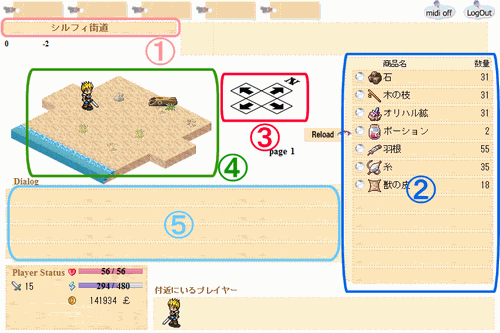
1. Current Location
This shows your current location.2. Your Inventory
This lists the items you are carrying.Click an item to open its details, where you can use or discard it.
3. Movement Controls
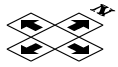 ← Use these to move around.
Move this character to travel to destinations such as other towns. Tip: You can also use the keyboard! Try the arrow keys or W/A/S/D.
4. Diorama
This diorama sets the scene.It shows at a glance what sort of place you are in: forest, grassland, coast, and so on.
5. Message Area
Results such as obtaining combat loot or gathering items appear here.About Combat
While walking in the field, you may encounter enemies (monsters) and enter combat.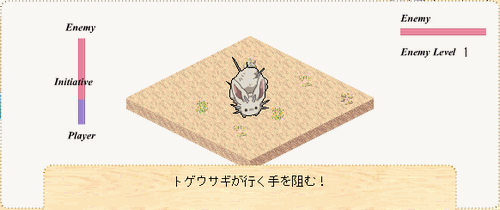 Don't panic. First, click the combat screen.
Commands will appear. The combat screen is arranged as follows.
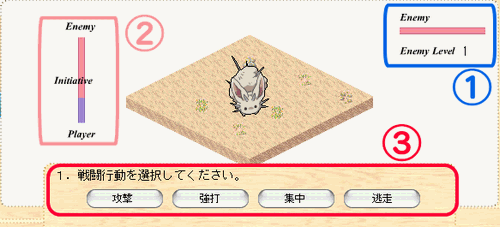
1. Monster Lv and Life
This shows the monster's level and Life.(You cannot see the exact Life value.)
2. Initiative
Which side has the initiative (priority) in combat is shown here.A larger red area means the enemy has the advantage;
a larger blue area means you have the advantage.
3. Commands
To proceed with combat, give your character action instructions.“Combat Action”(offensive action) and “Response to Enemy Attack”(reactive action): give instructions in these two parts.
Each instruction means the following.
“Combat Action” Instructions
- “Hand-to-Hand Combat” … Perform a normal attack.
- “Heavy Blow” … Try to deal greater damage to your opponent.
- “Focus” … Concentrate your energy instead of attacking to try to gain initiative.
- “Flee” … Try to escape instead of attacking.
“Response to Enemy Attack” Instructions
- “Normal” … Take no special action.
- “Defense” … Take a defensive stance to try to reduce damage as much as possible.
- “Evasion” … Try to avoid the enemy's attack altogether.
- “Targeting” … Track your opponent instead of defending to try to gain initiative.
and give appropriate instructions.
After you finish giving instructions, the combat unfolds as shown below.
(Click the combat screen to see what happens next.)
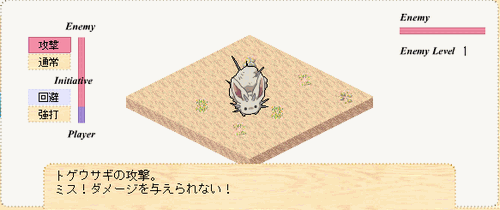 Combat is turn-based: both sides finish their actions → give instructions again. This repeats
 until either side is defeated or flees.
Winning a Battle
When you defeat the enemy and win, loot may be awarded.However, if your inventory is full, you cannot receive the loot and it is discarded, so be careful.
Losing a Battle
If you are defeated, you are sent back to the town where your shop is located.Also, the death penalty may cause you to lose one type of item from your inventory.
Restore Your Life
If You Are Hurt in Combat…
When your Life gets low, return to town and visit the “Tavern” to recover.In the main menu, open “Community”, then select “Tavern”.
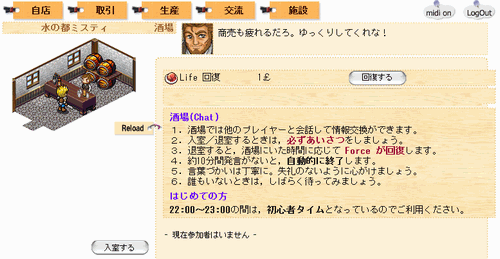
 : press this button to spend money and restore your Life.
Early Combat Tips
How are your battles going?Early on, you can usually win with “Heavy Blow”→“Defense or Evasion” as your action pattern.
Try this as a starting point for choosing your actions.
Now, Thread (3) and Beast Hide (6): once you have collected these, return to Misty, City of Water.
On the next page, we will learn sewing knowledge.