 Tutorial
Displaying Goods for Sale
Display the Goods You Made
In the main menu, select “My shop”, then open the submenu “Inventory” to see your inventory list.In the list, find “Cloth Clothes” or “Leather Gloves” and click it.
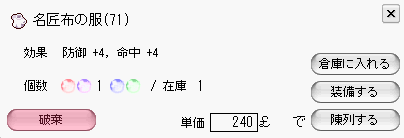 On the right side of the screen above, press
  to put it on display.
Tip: You can put goods on display even from another town. (You cannot view your display status from there.)
to put it on display.
Tip: You can put goods on display even from another town. (You cannot view your display status from there.)
What Is the Prefilled Price?
The unit price field already contains an amount.This amount is the going market price in the town you are currently in.
Keep this in mind when displaying goods from another town.
Check Your Display Shelves
After putting goods on display, check your Display Shelves.In the main menu, select “My shop”, then open the submenu “Display Shelves” to view the status of your Display Shelves.
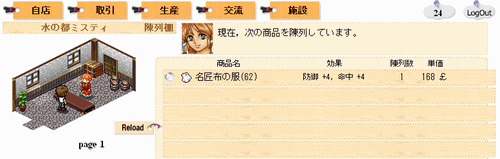 Once you have confirmed that the goods are properly displayed, you are done.
To Remove Goods from Display…
Click the item you want to remove from display, thenpress the button at the bottom left:
 to remove it from display.
Now Wait for Your Goods to Sell
Goods do not necessarily sell immediately after being displayed, so wait patiently.Once displayed, goods can sell even while you are logged out, so there is no need to worry.